GPU Cloud Workstation for KeyShot
We Concentrate On People and The Joy Of Creation.
Optimize for KeyShot GPU Rendering Tasks.

A GPU-Accelerated Cloud Render Farm for KeyShot
iRender Render Farm is a GPU-Acceleration Cloud Rendering Service for KeyShot High-End Rendering with Powerful Render Nodes: 1/2/4X RTX 4090. Rent servers in the IaaS Render Farm model (Infrastructure as a Service) at your disposition and enjoy working with a scalable infrastructure.
Let’s work together and “Happy Rendering”.

High-Speed Online Rendering Service for KeyShot
iRender: KeyShot Render Farm – Render Nodes: 1/2/4x RTX 4090.
Support all 3D Software with KeyShot: Cinema 4D, Maya, 3dsMax, Rhinoceros, SketchUp, SolidWorks and so on.

Why Choose IaaS Over SaaS for KeyShot Online Rendering?
Keyshot & GPU Rendering
KeyShot is widely recognized as one of the premier 3D rendering and animation solutions for creating photorealistic product visuals. Featuring advanced real-time ray-tracing, global illumination, and powerful CPU & GPU rendering capabilities, KeyShot enables designers to display results instantly and drastically speed up their production workflows.
Favored by industrial designers, 3D artists, and top brands worldwide, KeyShot offers an intuitive drag-and-drop interface complete with material and environment presets, interactive labeling, and physical lighting. Furthermore, with native support for over 30 leading 3D file formats, it seamlessly integrates with your favorite CAD applications to keep design iterations perfectly in sync.
As we know, KeyShot can process jobs in both CPU and GPU mode. (See more for the system requirements).

KeyShot Multi-GPU Performance Analysis: Acceleration Factor vs. Single RTX 4090
Keyshot GPU Rendering performance on RTX4090
Keyshot can support GPU rendering from Keyshot 9 and above and has become popular in recent years due to advances in GPU technology and the advent of high-performance graphics cards. GPUs excel at parallel processing, making them ideal for tasks that require large amounts of data to be processed simultaneously.
When using GPU rendering, the main factors that affect performance are the graphics card specifications, such as the number of CUDA cores, clock speed, and memory bandwidth. GPUs with a higher number of CUDA cores, higher clock speeds, and wider memory buses can provide better rendering performance.
In general, we can see that RTX4090 specification is so attractive and could outperform older Ampere architecture graphics cards such as RTX3090. However, is it really faster in rendering? We would look into some benchmark tests to have an answer.
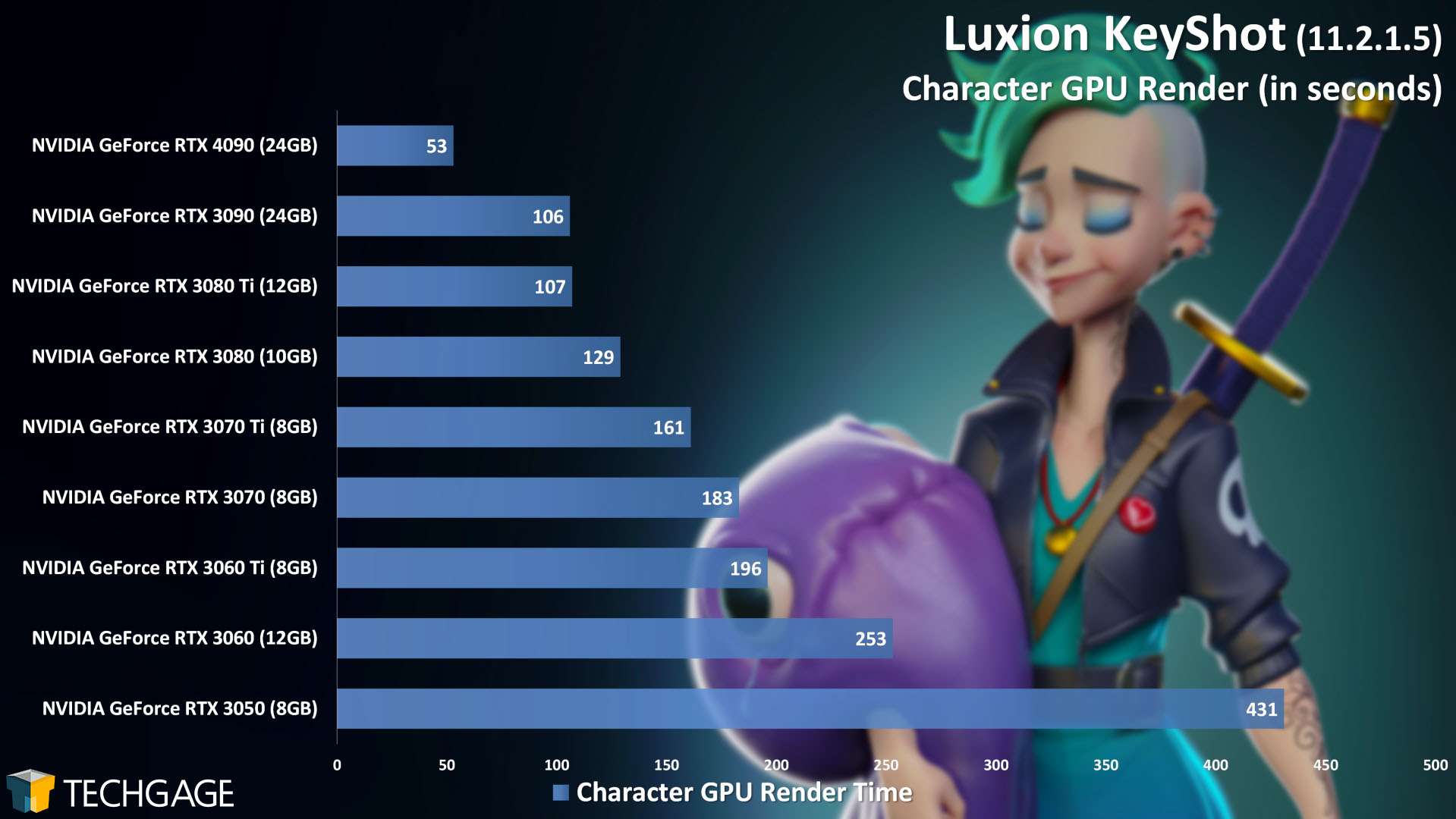
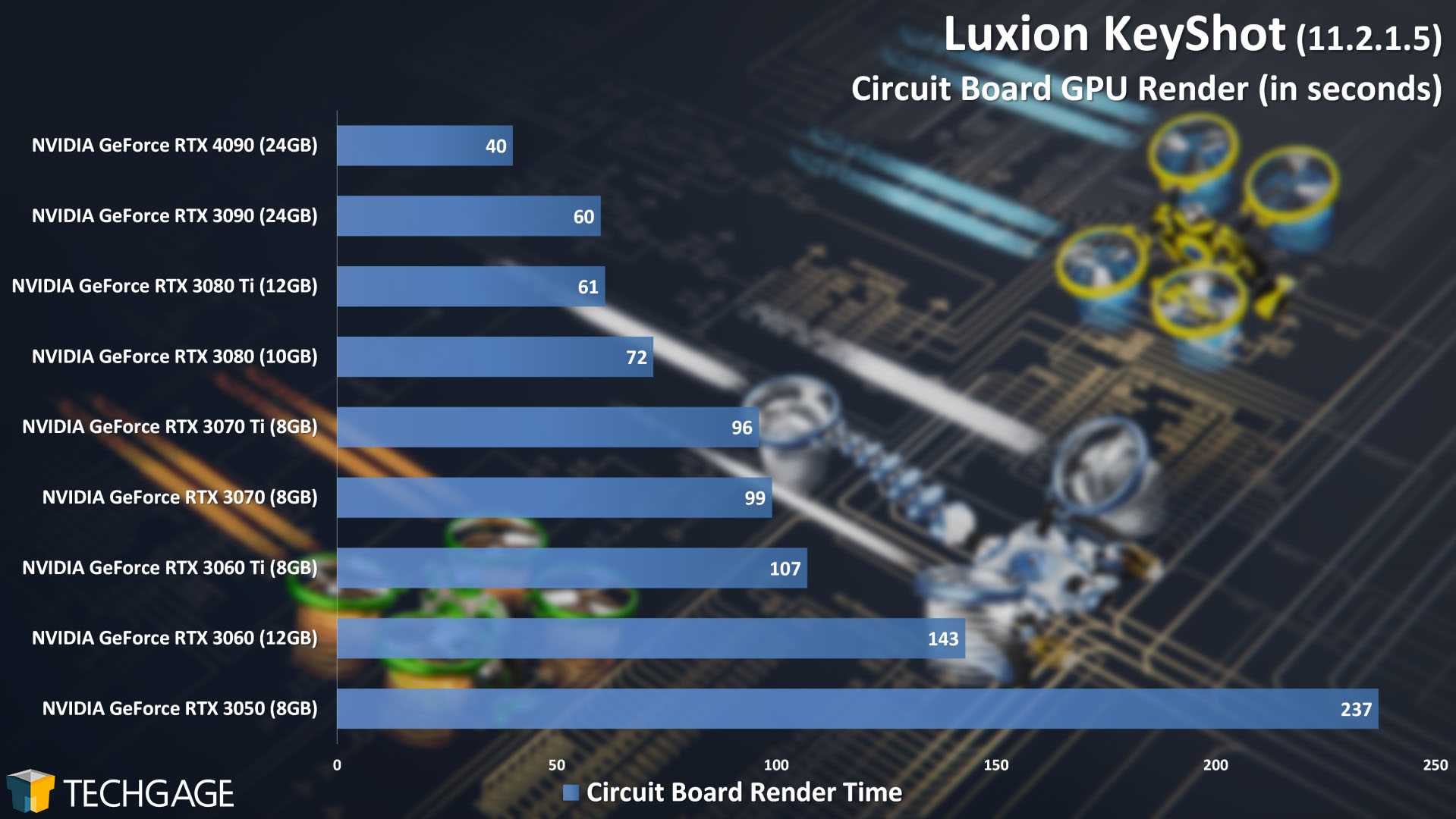
Undoubtedly, RTX4090 is the fastest. TechGage team has tested on two scenes, and RTX4090 is 2 or 1.5 times faster than RTX3090.
In the first scene it rendered a character. While RTX3090 takes 106 seconds to render, RTX4090 only takes half of the time and finishes in 53 seconds.
The second scene is Circuit board and this time RTX4090 takes 40 seconds to render. It’s about 1.5 times faster than RTX3090.
RTX4090 is a phenomenally powerful GPU. Depending on your project’s render settings, the speed could vary and sometimes it could deliver a double performance.
From the testing it’s undoubtedly RTX4090 is one of the best choices for Keyshot rendering, because of its power and high amount of CUDA cores and RT cores. But you can find a render farm for it, not necessarily buy one.
Unmatched performance with CPU & multi- GPU servers at iRender
If your local machine is struggling with heavy KeyShot projects—and you aren’t ready to invest a fortune in an expensive new workstation—offloading your render workload to a cloud render farm is the smartest decision. As a leading cloud GPU provider, iRender offers full support for both KeyShot CPU and GPU rendering. We deliver instant access to enterprise-grade server infrastructure, allowing you to render significantly faster and more efficiently without expensive hardware upgrades.
All of our dedicated servers are equipped with:
-
-
-
- AMD Ryzen™ Threadripper™ PRO 3955WX (3.9-4.2GHz) or
- AMD Ryzen™ Threadripper™ PRO 5975WX (3.6-4.5GHz)
- (1/2/4x) – RTX 4090
- 256GB RAM
- 2TB NVMe SSDs
-
-
What else can users get from iRender Render Farm?
Control Over Your Remote Environment
When you rent an iRender server, you get 100% administrative access to a dedicated remote workstation. You are free to install your own software licenses, set up custom pipelines, configure plugins, and tweak settings exactly the way you prefer. Your environment remains completely private, secure, and personalized to your unique workflow.
Cost-Effective Pricing
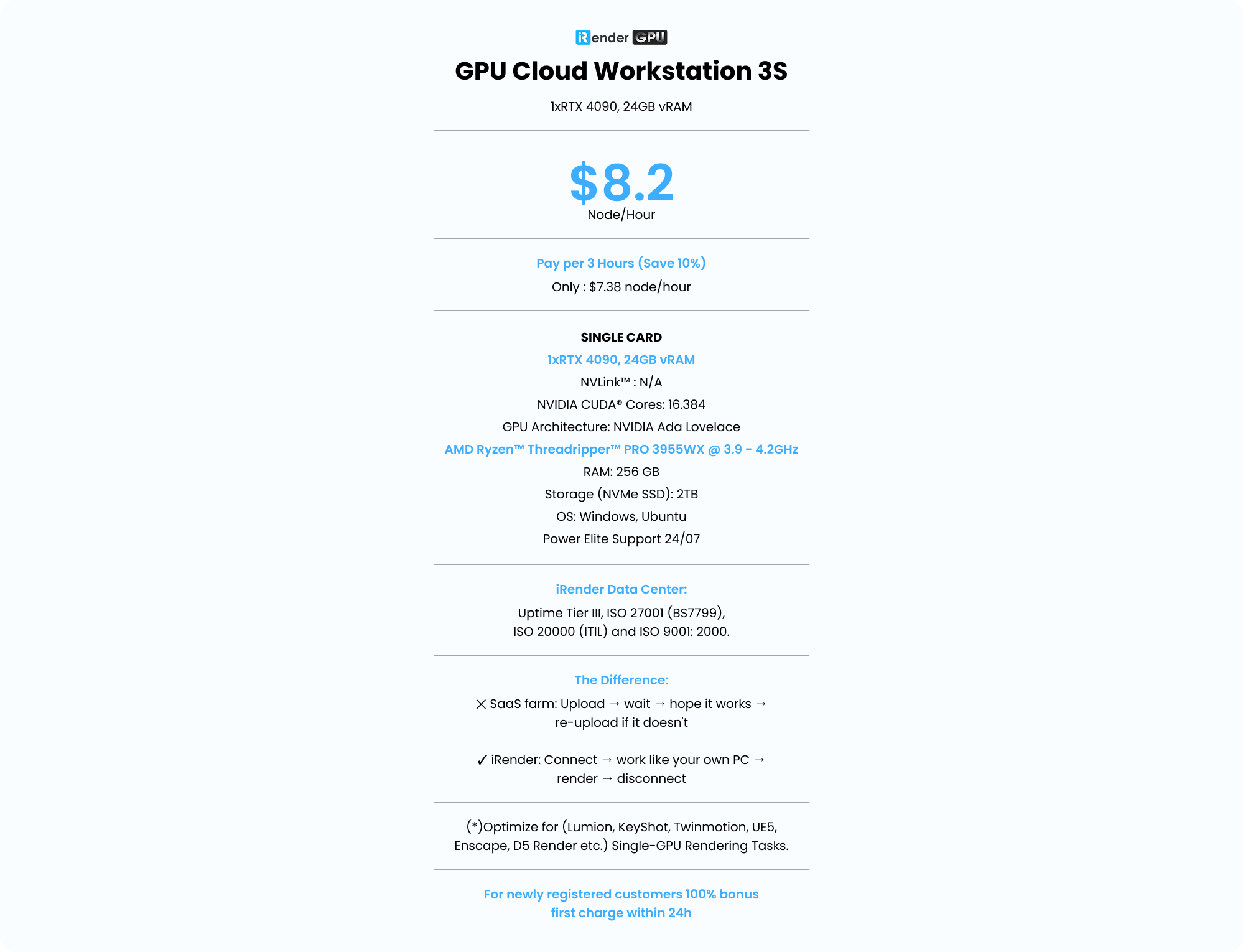
Our RTX 4090 cloud server starts at $8.2/hour, making it a good choice for short projects, testing, or one-time rendering jobs. Besides, iRender offers budget-friendly rental options:
-
Fixed Rental Savings: Save 10% instantly when renting a server for 3 hours or more compared to standard pay-as-you-go hourly rates.
-
Ideal for Heavy Workloads: Perfect for professional artists and studios running continuous, long-term rendering jobs without the risk of accumulating unexpected hourly charges.
Free transfering Tool: iRender GPU app
To streamline your workflow, iRender offers a powerful, proprietary file transfer tool iRender GPU app. Designed for high-speed transmission and heavy data loads, it allows you to upload all your project assets, textures, and files at any time without needing to boot up or connect to your paid cloud server.
Once uploaded, your data is automatically synchronized directly to the Z drive inside your remote workstation, fully prepared and accessible as soon as you start your rendering session.
Real human support
If you have any problems, our support team is ready to help. We don’t rely only on automatic replies, you can talk to a real person who understands cloud rendering.
Whether you need help choosing a server, connecting to the cloud, moving your project files, or fixing a technical issue, our team will guide you step by step. We always try to reply quickly so you can get back to work as soon as possible.
Easy to use
Rendering with iRender is an effortless experience built around 5 steps:
-
Register an iRender account.
-
Recharge money.
-
Upload project files to the cloud.
-
Choose your server package and connect.
-
Take 100% full administrative control of your private remote workstation.
As one of the few render farms with a dedicated transfer app, iRender GPU app allows seamless file synchronization without third-party tools. You can upload files anytime even while the remote server is turned off.
How to install iRender GPU App:
-
Download and install the desktop app onto your local computer.
-
Launch the app and log in using your iRender account.
Check out the video tutorial below for a visual step-by-step guide:


We Focus On People And The Joy Of Creation.
“iRENDER RENDER FARM – HAPPY RENDERING”
Cloud GPU Pricing
Compare our server performance and price with major companies such as GPU Instances from AWS, GPU Instances from Google, Azure from Microsoft and GPU servers from small competitors. You’ll be surprised!
You can install all software you want on our remote server
GPU Cloud Workstation 3S
1xRTX 4090, 24GB vRAM- Pay per 3 hours and more (Save 10%)
- Only : $7.38 node/hour
- SINGLE CARD
- 1xRTX 4090, 24GB vRAM
- NVLink™ : N/A
- NVIDIA CUDA® Cores: 16.384
- GPU Architecture: NVIDIA Ada Lovelace
- AMD Ryzen™ Threadripper™ PRO 3955WX @ 3.9 - 4.2GHz
- RAM: 256 GB
- Storage (NVMe SSD): 2TB
- OS: Windows, Ubuntu
- Power Elite Support 24/07
- iRender Data Center: Uptime Tier III, ISO 27001 (BS7799), ISO 20000 (ITIL) and ISO 9001: 2000.
- The Difference: ✕ SaaS farm: Upload → wait → hope it works → re-upload if it doesn't ✓ iRender: Connect → work like your own PC → render → disconnect
- (*)Optimize for (Lumion, KeyShot, Twinmotion, UE5, Enscape, D5 Render etc.) Single-GPU Rendering Tasks.
- For newly registered customers 100% bonus first charge within 24h
GPU Cloud Workstation 4S
2xRTX 4090, 24GB vRAM- Pay per 3 hours and more (Save 10%)
- Only : $13.5 node/hour
- MULTI GPU
- 2xRTX 4090, 24 GB vRAM
- NVLink™ : N/A
- NVIDIA CUDA® Cores: 2 x 16.384
- GPU Architecture: NVIDIA Ada Lovelace
- AMD Ryzen™ Threadripper™ PRO 3955WX @ 3.9 - 4.2GHz
- RAM: 256 GB
- Storage (NVMe SSD): 2TB
- OS: Windows, Ubuntu
- Power Elite Support 24/07
- iRender Data Center: Uptime Tier III, ISO 27001 (BS7799), ISO 20000 (ITIL) and ISO 9001: 2000.
- The Difference: ✕ SaaS farm: Upload → wait → hope it works → re-upload if it doesn't ✓ iRender: Connect → work like your own PC → render → disconnect
- (*)Optimize for (Redshift, Octane, Blender, V-Ray Next, UE5, Maxwell etc.) Multi-GPU Rendering Tasks.
- For newly registered customers 100% bonus first charge within 24h
GPU Cloud Workstation 5S
4xRTX 4090, 24GB vRAM- Pay per 3 hours and more (Save 10%)
- Only : $27 node/hour
- MULTI GPU
- 4xRTX 4090, 24 GB vRAM
- NVLink™ : N/A
- NVIDIA CUDA® Cores: 4 x 16.384
- GPU Architecture: NVIDIA Ada Lovelace
- AMD Ryzen™ Threadripper™ PRO 5975WX @ 3.6 - 4.5GHz
- RAM: 256 GB
- Storage (NVMe SSD): 2TB
- OS: Windows, Ubuntu
- Power Elite Support 24/07
- iRender Data Center: Uptime Tier III, ISO 27001 (BS7799), ISO 20000 (ITIL) and ISO 9001: 2000.
- The Difference: ✕ SaaS farm: Upload → wait → hope it works → re-upload if it doesn't ✓ iRender: Connect → work like your own PC → render → disconnect
- (*)Optimize for (Redshift, Octane, Blender, V-Ray Next, Iray, Maxwell etc.) Multi-GPU Rendering Tasks.
- For newly registered customers 100% bonus first charge within 24h
Latest News
The latest creative news from KeyShot Cloud Rendering , Cinema 4D Cloud Rendering , Lumion Cloud rendering, V-Ray Cloud Rendering , Twinmotion Cloud Rendering , 3D VFX Plugins & Cloud Rendering.