Powerful Cloud Render Farm for Cinema 4D using OctaneRenderer.
We Concentrate On People and The Joy Of Creation.
Optimize for Cinema 4D using Octane Rendering tasks on the Cloud.
The IaaS render farm of Cinema 4D and Octane.

Cinema 4D & Octane Render Farm Service
iRender Render Farm is a GPU-Acceleration Cloud Rendering Service for Cinema 4D using Octane Multi-GPU Rendering with Powerful Render Nodes: 2/4 RTX 4090. Rent servers in the IaaS Render Farm model (Infrastructure as a Service) at your disposition and enjoy working with a scalable infrastructure.
Let’s work together and “Your Renders, Your Rules”.

High-speed Cloud Render Farm for Cinema 4D with Octane render engine.
iRender: Cinema 4D & Octane Render Farm – Render Nodes: 2/4 x RTX 4090.
Supports all Cinema 4D built-in and external render engines such as Redshift, Octane, Cycles 4D, Corona, V-Ray, Maxwell, Arnold, LuxCore and so on.
Why Choose IaaS Over SaaS for C4D/Octane Multi-GPU Rendering?
Why is iRender considered the ultimate cloud solution for Cinema 4D and Octane?
iRender – as an IaaS render farm model – delivers an unparalleled cloud environment for 3D artists by perfectly matching the infrastructure requirements of all modern GPU-driven rendering software including Cinema 4D and Octane through four critical advantages:
- Linear Multi-GPU Scaling: Modern GPU render engines (like Redshift, Octane, Blender Cycles, and V-Ray GPU) scale almost perfectly with multiple graphics cards. iRender answers this by providing dedicated servers equipped with up to multiple RTX 4090 GPUs on a single motherboard, slashing render times exponentially compared to standard single-GPU setups.
- Eliminating VRAM and “Out-of-Core” Bottlenecks: Heavy production scenes with high-resolution textures and dense geometry easily exceed the 24GB VRAM limit of a single card, causing crashes or forcing software into slow “Out-of-Core” memory swapping. iRender mitigates this by pairing multi-GPU configurations with massive system memory (256GB RAM) and high-tier AMD Ryzen Threadripper Pro CPUs to ensure smooth data processing.
- Absolute Custom Pipeline and Plugin Support: Creative pipelines heavily rely on specific software versions, proprietary scripts, and custom plugins (such as X-Particles, Phoenix FD, or customized shaders). While traditional SaaS farms restrict users to rigid, pre-installed environments, iRender’s IaaS model grants full administrative Remote Desktop access, enabling artists to build and customize their pipeline exactly like a local workstation.
- Real-Time Troubleshooting and Live Previewing: Traditional SaaS farms operate as a “black box” where rendering errors are only discovered after the process fails, leading to wasted time. With iRender, artists can open their DCC software and utilize real-time interactive renderers (like Octane Live Viewer or Redshift RenderView) directly on the cloud server, allowing them to fix bugs and patch assets on the fly to secure critical project deadlines.
Why Scale Up? C4D/Octane Multi-GPU Performance Analysis
Acceleration factor of iRender dedicated multi-GPU nodes vs. a standard single-RTX 4090 workstation.
| Infrastructure Node | Estimated Speedup Factor | VRAM Efficiency | Production Pipeline Use-Case |
|---|---|---|---|
| Standard Workstation (1x RTX 4090) |
1.0x BaselineStandard performance benchmark for local single-GPU computing environments. | 24 GB VRAMBaseline memory capacity. Constrained by massive texture pools and heavy geometry assets. | LookDev & Look StylingInitial scene blockout, basic shader nodes assignments, and individual asset shading. |
| iRender Dual-GPU (2x RTX 4090) |
~1.95x to 1.98x FasterExceptional linear scaling driven by Octane’s native parallelized CUDA ray-tracing kernels. | 24 GB VRAM (Per Card)Maintains standalone hardware caching allocation, vastly reducing sample render noise per pass. | High-End Motion GraphicsTailored for complex 3D motion design, premium product commercials, and studio animatics. |
| iRender Quad-GPU (4x RTX 4090) |
~3.85x to 3.92x FasterExpedites heavy rendering hours into minutes. Drastically reduces Path Tracing computation cycles. | 24 GB VRAM (Out-of-Core Optimized)Enables seamless deployment of Octane Out-of-Core to stream heavy EXR data sets without latency. | Cinematic VFX & SimulationEngineered for photorealistic scatter environments, complex VDB volumes, and refractive materials. |
| iRender Hexa-GPU (6x RTX 4090) |
~5.7x to 5.85x FasterIndustrial-grade processing throughput. Multiplies frame iterations to maximize production speed. | Dedicated PCIe Lane IsolationRequires a powerful IaaS bare-metal architecture to prevent data starvation across the 6 GPUs. | Studio Crunch & Fast TurnaroundsDesigned for animation studios managing critical delivery schedules for multi-shot digital assets. |
| iRender Octa-GPU (8x RTX 4090) |
~7.5x to 7.8x FasterPeak hardware scaling performance. Resolves massive spectral path-tracing data almost instantly. | Max Power Base StationDemands bare-metal redundant power supplies and premium cooling to prevent hardware thermal throttling. | Feature Films & XR ProductionsThe ultimate choice for 8K video rendering, cinematic virtual production, and enterprise mega-scenes. |
Overview of Maxon Cinema 4D and OctaneRender
Maxon Cinema 4D is a powerful 3D modeling robust software, developed by MAXON computer, based in Germany. It gives an extensive suite of tools that aid 3D artists to give amazing results. Cinema 4D is proficient in procedural and polygonal modeling, texturing, lighting and rendering. In this modern, fast-going world where 3D production is so in demand, this program stands out and is very trustworthy for artists who are professionals as well as beginners both.
Octane is one of the world’s first and fastest GPU-accelerated, unbiased, physically correct renderer. Octane was developed by a New Zealand-based company called Refractive Software, Ltd in 2008, and was later taken over by the Company OTOY in 2012. Now it is being used in feature films, commercials, and even architectural rendering.
Powerful, High-speed GPU Render Farm for Cinema 4D with OctaneRender
Check this link for the information related to what hardware and operating systems are required for Cinema 4D and Octane to work properly. Please make sure that your system meets the requirements listed to make full use of these software powers.
iRender’s cloud workstation configuration exceeds all the hardware requirements above.
-
-
-
- Single to multiple RTX 4090 GPU 24GB vRAM
- AMD Ryzen™ Threadripper™ PRO 3955WX @ 3.9 – 4.2GHz or
- AMD Ryzen™ Threadripper™ PRO 5975WX @ 3.6 – 4.5GHz
- 256GB RAM
- 2TB Storage (NVMe SSD)
-
-
As an Infrastructure as a Service model, we provides the flexibility to support many different rendering workflows on one platform. With iRender, users can select the hardware and environment that best fit their projects, making it an excellent choice for Cinema 4D and Octane users.
Let’s check out the rendering performance in Octane & Cinema 4D on RTX 4090 servers.

What's else you can get when choosing iRender Service?
1. Licensed Cinema 4D and Octane cloud workstations
At iRender you can choose machines with Cinema 4D and Octane pre-installed, ensuring a seamless creative workflow for users. iRender also manages regular software and NVIDIA driver updates to maximize efficiency. This preconfiguration enables users to optimize their pipeline and focus solely on their renders without the hassle of environment configuration or troubleshooting compatibility issues. Users simply upload project files to iRender’s machines and start high-performance renders instantly, which saves valuable time.
2. Deeper discount with Rental Plan
You will be charged on a per-minute basis. Depending on the type of server you choose, we will issue you an invoice once you shut down the servers, so that you will control your balance easily.
The hourly rental option is always available for you to choose. However, you can always save 10% with our Rental Plan feature. For those who’re in need of a server for more than a day, or have an extremely large project, we advise choosing a daily/weekly/monthly rental package. The discount is attractive (10%).
We accept payment through Onepay, bank transfer, Visa/ Mastercard. And of course, we sometimes provide promotions for customers on special occasions. Staying connected with us to keep updating these programs.
3. Real human support from 6:00 to 24:00
Users can access our web-based online platform and use multiple nodes to render at the same time. Hence, with us, it does not matter where you are present – as long as you are connected to the internet, you can access and enjoy the 24/7 rendering services that we provide, and if you meet any issue, our real human support team is always ready to support you from 6:00 to 24:00 (GMT +7).
4. Easy to use and simple process
What you need to do is just 5 simple steps including: Creating an iRender account, Recharging money, Transferring your files to the remote server, Selecting a package and connecting to the server then finally Taking full control of the server and doing whatever you want.
We ensure that we provide you the easy-to-use interesting and effective solution. With just one or two clicks to create an image, and 7 to 15 minutes to boot the system in the first time, you will use the servers (GPUs & CPUs) like your own PC. Additionally, you just need to set up a working environment once, and save as Images to keep it for life.
With the aim to effectively equip users, reduce the procedure of using application and website at the same time, iRender has released a desktop app called iRender GPU App. It will contain almost all the features, help you to recharge your account, transfer files and connect to the remote servers/machines on your own local PC without having to come to the iRender website.
The following section will help you know how to install iRender GPU and use it.
-
-
-
- Download and install the app on your local PC.
- Register/login the app by your iRender account and follow this instruction to use it.
-
-
Watch this video tutorial on how to use iRender GPU app:
With the above advantages and the machine configuration package that iRender are offering, we believe that Cinema 4D users will have the most comfortable, quickest, and most effective rendering time with Octane.
Register an account on iRender to claim your 100% bonus for the first deposit and render without limitations.
Your Renders, Your Rules.

“We focus on people and the joy of creation!”
"iRender Farm’s green data center is powered by solar energy, as part of our natural and eco-friendly commitment to a sustainable future."
GPU Render Farm Pricing
Compare our server performance and price with major companies such as GPU Instances from AWS, GPU Instances from Google, Azure from Microsoft and GPU servers from small competitors. You’ll be surprised!
You can install all software you want on our remote server
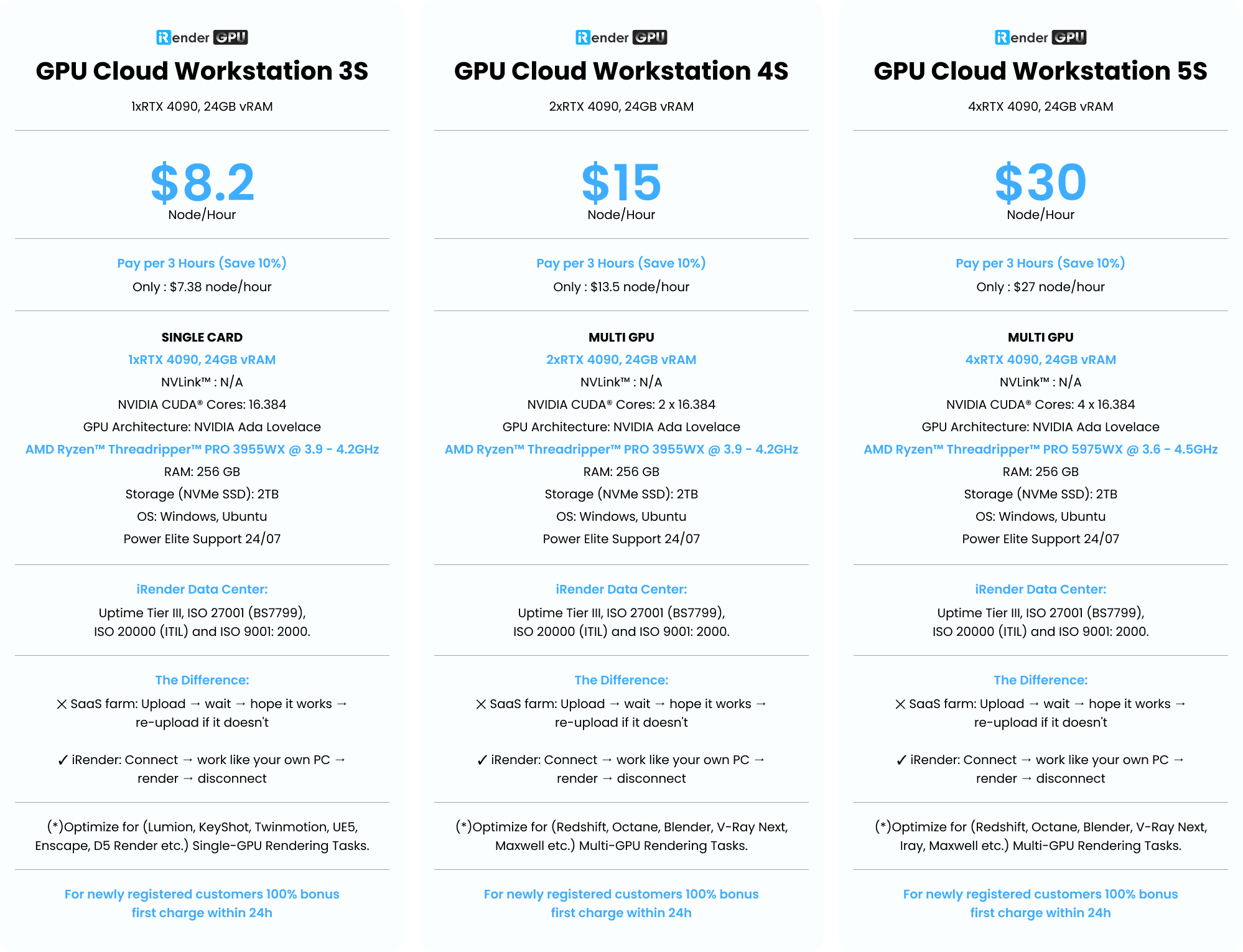
GPU Cloud Workstation 3S
1xRTX 4090, 24GB vRAM- Pay per 3 hours and more (Save 10%)
- Only : $7.38 node/hour
- SINGLE CARD
- 1xRTX 4090, 24GB vRAM
- NVLink™ : N/A
- NVIDIA CUDA® Cores: 16.384
- GPU Architecture: NVIDIA Ada Lovelace
- AMD Ryzen™ Threadripper™ PRO 3955WX @ 3.9 - 4.2GHz
- RAM: 256 GB
- Storage (NVMe SSD): 2TB
- OS: Windows, Ubuntu
- Power Elite Support 24/07
- (*)Optimize for (Lumion, KeyShot, Twinmotion, UE5, Enscape, D5 Render etc.) Single-GPU Rendering Tasks.
- The Difference: ✕ SaaS farm: Upload → wait → hope it works → re-upload if it doesn't ✓ iRender: Connect → work like your own PC → render → disconnect
- For newly registered customers 100% bonus first charge within 24h
GPU Cloud Workstation 4S
2xRTX 4090, 24GB vRAM- Pay per 3 hours and more (Save 10%)
- Only : $13.5 node/hour
- MULTI GPU
- 2xRTX 4090, 24 GB vRAM
- NVLink™ : N/A
- NVIDIA CUDA® Cores: 2 x 16.384
- GPU Architecture: NVIDIA Ada Lovelace
- AMD Ryzen™ Threadripper™ PRO 3955WX @ 3.9 - 4.2GHz
- RAM: 256 GB
- Storage (NVMe SSD): 2TB
- OS: Windows, Ubuntu
- Power Elite Support 24/07
- (*)Optimize for (Redshift, Octane, Blender, V-Ray Next, UE5, Maxwell etc.) Multi-GPU Rendering Tasks.
- The Difference: ✕ SaaS farm: Upload → wait → hope it works → re-upload if it doesn't ✓ iRender: Connect → work like your own PC → render → disconnect
- For newly registered customers 100% bonus first charge within 24h
GPU Cloud Workstation 5S
4xRTX 4090, 24GB vRAM- Pay per 3 hours and more (Save 10%)
- Only : $27 node/hour
- MULTI GPU
- 4xRTX 4090, 24 GB vRAM
- NVLink™ : N/A
- NVIDIA CUDA® Cores: 4 x 16.384
- GPU Architecture: NVIDIA Ada Lovelace
- AMD Ryzen™ Threadripper™ PRO 5975WX @ 3.6 - 4.5GHz
- RAM: 256 GB
- Storage (NVMe SSD): 2TB
- OS: Windows, Ubuntu
- Power Elite Support 24/07
- (*)Optimize for (Redshift, Octane, Blender, V-Ray Next, Iray, Maxwell etc.) Multi-GPU Rendering Tasks.
- The Difference: ✕ SaaS farm: Upload → wait → hope it works → re-upload if it doesn't ✓ iRender: Connect → work like your own PC → render → disconnect
- For newly registered customers 100% bonus first charge within 24h
(*) In addition, we also have professional machine configurations for AI Inference, AI Training, Deep Learning, VR/AR…
With Ada Lovelace GPU Architecture: 1/2/4 x RTX 4090, 24GB vRAM..
Or any configuration you require, please contact directly for service. Sincerely thank you!
Latest News
The latest creative news from Cinema 4D Cloud Rendering , Blender Cloud Rendering, Redshift Cloud Rendering, Houdini Cloud Rendering , Octane Cloud Rendering, 3D VFX Plugins & Cloud Rendering.