Powerful D5 Cloud Rendering Service.
We Concentrate On People and The Joy Of Creation.
Optimize for D5 Render GPU Rendering Tasks.
One of the few GPU Render Farms supporting both Single (Real-time Rendering) and Multi-GPU rendering.

D5 Cloud GPU on Your Desk
iRender is a GPU-Accelerated Cloud Render Farm for high-end D5 Render visualization. Powered by elite RTX 4090 nodes in a flexible IaaS model, it places scalable infrastructure at your disposition. Let’s collaborate and enjoy: “Your Renders, Your Rules!”
Powerful Cloud Render Farm service that support single GPU for D5 Render
iRender: D5 Cloud rendering – Render Nodes: RTX 4090.
Support all 3D Software with D5 Render: 3ds Max, Blender, Rhino, Revit, SketchUp, ArchiCAD and so on.
Overview of D5 Render
D5 Render is a real-time renderer based on real-time ray tracing technology, widely used for interior and exterior archviz rendering. First released in January 2020 by the developer Dimension 5, it combines both ray tracing and rasterization to deliver real-time interactivity alongside photorealistic visual quality.
Since its release, D5 Render has rapidly become one of the most promising and powerful render engines on the market, drawing on the long-standing strengths of industry staples like V-Ray, Corona, Lumion, and Twinmotion.
D5 Render requires specific hardware configurations to efficiently load scenes, render, and run smoothly. In this article, we will examine the top recommended hardware specifications and compare them with our single RTX 4090 server config to determine if it is the ideal setup for your D5 Render projects.
Our Solution for D5 Render Users, and How We Differentiate
D5 Render Architectural & Technical Matrix
Enterprise infrastructure evaluation for real-time architectural visualization and high-end D5 rendering pipelines.
| Architectural Criteria | iRender (IaaS GPU Cloud Workstation) ? | SaaS Render Farm (Automated Systems) ⚙️ |
|---|---|---|
| Service Model | IaaS (Infrastructure as a Service) Provides full-root administrative access to dedicated physical bare-metal servers, allowing users to launch and operate the native D5 Render interface directly within a standalone Windows environment. |
SaaS (Software as a Service) Restricted to an automated static asset packaging model (Batch Rendering) with no interactive user interface or software environment control. |
| D5 Compatibility | 100% Native Support Flawlessly runs any version of D5 Render. Users have full freedom to download massive local Asset Libraries and precisely configure advanced image/video output formats. |
Structural Incompatibility Automated pipelines lack an editor-based opening mechanism, making it technically impossible to process D5 Render’s specialized real-time project file formats. |
| Real-time Viewport | Near-Zero Latency Streaming Direct remote control over physical GPUs allows fluid viewport navigation, real-time adjustments of AI materials and geo-environments, and instantaneous visual feedback. |
Technically Impossible The static “upload-and-wait” execution loop entirely eliminates real-time viewport interaction, preventing pre-render visual verification or error corrections. |
| Hardware Optimization | Homogeneous Single RTX 4090 Provides dedicated physical nodes equipped with a standalone RTX 4090. Perfectly streamlined to match D5 Render’s strict Single-GPU architectural dependency without virtualization bottlenecks. |
Heterogeneous Hardware Mix Distributes render workloads randomly across mixed clusters (RTX 3080 / 3090 / 4090), triggering driver conflicts, project crashes, and performance throttling to the weakest card. |
| Scalability | On-Demand Scalability Instantly boot multiple independent Single RTX 4090 workstations simultaneously via the unified iRender App Desktop All-in-one based on the volume of video animations. |
Passive Scheduling Heavily dependent on the automated resource pool availability, forcing users into shared infrastructure queues with no deployment control. |
| Information Security | Enterprise-Grade Standards Hosted in a Certified International Tier 3 Data Center with 24/7 biometric physical control, automated post-session storage overwriting (Wiping), and legally binding NDAs. |
Uncertified EnvironmentsProject assets are centrally processed via automated deployment scripts over shared server networks, significantly elevating the risks of cross-tenant data leakage or cloud processing interference. |
What other benefits can users get from iRender Render Farm?
Take over your working environment
iRender provide to you high performance and configurable server system for 3D rendering, AI Training, VR & AR, simulation, etc. We believe that design and creative activities are private and personal that only you artists will know what you want with your animation. That’s the reason why we provide remote server so that you can install any software you need, and do whatever you like with your project.
Simply set up your environment once, your personalized workstation will be fully configured and ready to render every time you reconnect.
Our famous single RTX 4090 package is one of the most powerful and reasonable package for D5 Render.
Free and convenient transferring tool
iRender offers a powerful and free file transfer tool: iRender GPU app. With fast file transfer speed, large data capacity, and completely free. You can transfer all the necessary data into our iRender GPU tool at any time without connecting to the server. The data will be automatically synchronized in the Z drive inside the server, ready for you to use.
Flexible price
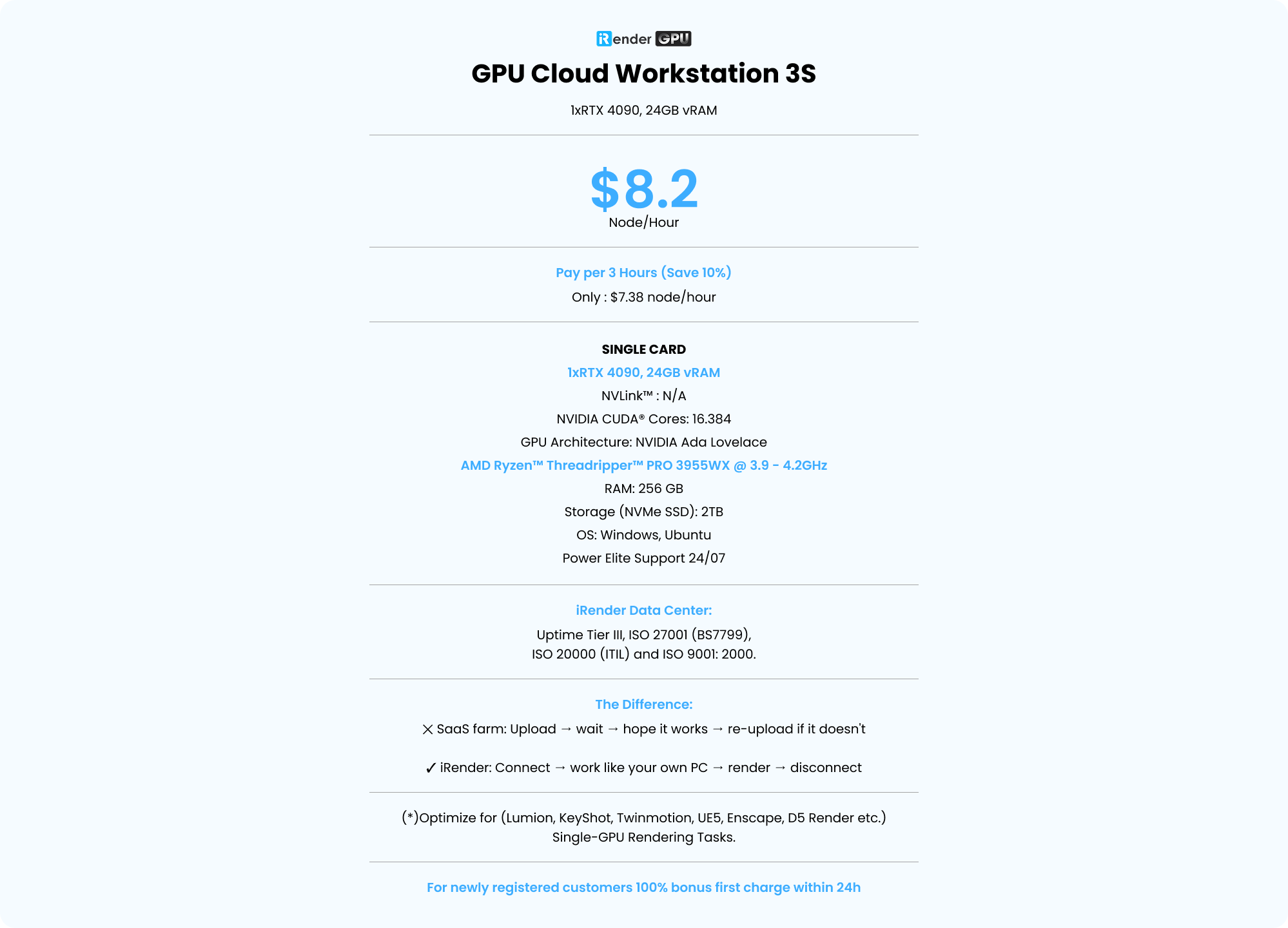
Our RTX 4090 cloud server starts at $8.2/hour, making it a good choice for short projects, testing, or one-time rendering jobs. If you plan to use the server for several hours, you can save 10% by choosing our Fixed Rental option.
For longer projects, we also offer daily, weekly, and monthly plans. These plans cost less than paying by the hour and help you manage your budget more easily. They are a great choice for freelancers, studios, and anyone who needs a server for regular work.
Another benefit is that you don’t have to worry about extra costs if you forget to shut down the server. With a fixed plan, you know exactly how much you will pay, so you can focus on your work without checking the rental time all the time.
Real human support
If you have any problems, our support team is ready to help. We don’t rely only on automatic replies, you can talk to a real person who understands cloud rendering.
Whether you need help choosing a server, connecting to the cloud, moving your project files, or fixing a technical issue, our team will guide you step by step. We always try to reply quickly so you can get back to work as soon as possible.
Simple Workflow
What you need to do is just 5 simple steps including: Creating an iRender account, Recharging money, Transferring your files to the remote server, Selecting a package and connecting to the server then finally Taking full control of the server and doing whatever you want.
We ensure that we provide you the easy-to-use interesting and effective solution. With just one or two clicks to create an image, and 7 to 15 minutes to boot the system in the first time, you will use the servers (GPUs & CPUs) like your own PC. Additionally, you just need to set up a working environment once, and save as Images to keep it for life.
With the aim to effectively equip users, reduce the procedure of using application and website at the same time, iRender has released a desktop app called iRender GPU App.
How to install iRender GPU App:
- Download and install the app on your local PC.
- Register/login the app by your iRender account and follow this instruction to use it.
Check out the video tutorial below for a visual step-by-step guide:

Render farm supports Single GPU
iRender takes care of the most demanding part of your D5 Render workflow — rendering — while keeping your local workstation free for creative tasks. Unlike traditional SaaS render farms that only process final frames, iRender provides dedicated cloud GPU workstations that run D5 Render directly, giving you the full power and flexibility of a high-end machine in the cloud.
As one of the few cloud platforms optimized specifically for real-time rendering applications, iRender delivers powerful single-GPU servers designed to maximize D5 Render performance. With dedicated RTX GPUs, high VRAM capacity, and a complete remote working environment, iRender allows architects, designers, and visualization artists to open projects, adjust scenes, preview changes, and render animations smoothly — just like working on a local workstation.
Enjoy the freedom of strong rendering power—boost your work and make your ideas come to life faster with iRender!
Your Renders, Your Rules!

We Focus On People And The Joy Of Creation.
“IRENDER – YOUR RENDERS, YOUR RULES”
Cloud GPU Pricing
Compare our server performance and price with major companies such as GPU Instances from AWS, GPU Instances from Google, Azure from Microsoft and GPU servers from small competitors. You’ll be surprised!
You can install all software you want on our remote server
GPU Cloud Workstation 3S
1xRTX 4090, 24GB vRAM- Pay per 3 hours and more (Save 10%)
- Only : $7.38 node/hour
- SINGLE CARD
- 1xRTX 4090, 24GB vRAM
- NVLink™ : N/A
- NVIDIA CUDA® Cores: 16.384
- GPU Architecture: NVIDIA Ada Lovelace
- AMD Ryzen™ Threadripper™ PRO 3955WX @ 3.9 - 4.2GHz
- RAM: 256 GB
- Storage (NVMe SSD): 2TB
- OS: Windows, Ubuntu
- Power Elite Support 24/07
- iRender Data Center: Uptime Tier III, ISO 27001 (BS7799), ISO 20000 (ITIL) and ISO 9001: 2000.
- The Difference: ✕ SaaS farm: Upload → wait → hope it works → re-upload if it doesn't ✓ iRender: Connect → work like your own PC → render → disconnect
- (*)Optimize for (Lumion, KeyShot, Twinmotion, UE5, Enscape, D5 Render etc.) Single-GPU Rendering Tasks.
- For newly registered customers 100% bonus first charge within 24h
GPU Cloud Workstation 4S
2xRTX 4090, 24GB vRAM- Pay per 3 hours and more (Save 10%)
- Only : $13.5 node/hour
- MULTI GPU
- 2xRTX 4090, 24 GB vRAM
- NVLink™ : N/A
- NVIDIA CUDA® Cores: 2 x 16.384
- GPU Architecture: NVIDIA Ada Lovelace
- AMD Ryzen™ Threadripper™ PRO 3955WX @ 3.9 - 4.2GHz
- RAM: 256 GB
- Storage (NVMe SSD): 2TB
- OS: Windows, Ubuntu
- Power Elite Support 24/07
- iRender Data Center: Uptime Tier III, ISO 27001 (BS7799), ISO 20000 (ITIL) and ISO 9001: 2000.
- The Difference: ✕ SaaS farm: Upload → wait → hope it works → re-upload if it doesn't ✓ iRender: Connect → work like your own PC → render → disconnect
- (*)Optimize for (Redshift, Octane, Blender, V-Ray Next, Maxwell etc.) Multi-GPU Rendering Tasks.
- For newly registered customers 100% bonus first charge within 24h
GPU Cloud Workstation 5S
4xRTX 4090, 24GB vRAM- Pay per 3 hours and more (Save 10%)
- Only : $27 node/hour
- MULTI GPU
- 4xRTX 4090, 24 GB vRAM
- NVLink™ : N/A
- NVIDIA CUDA® Cores: 4 x 16.384
- GPU Architecture: NVIDIA Ada Lovelace
- AMD Ryzen™ Threadripper™ PRO 5975WX @ 3.6 - 4.5GHz
- RAM: 256 GB
- Storage (NVMe SSD): 2TB
- OS: Windows, Ubuntu
- Power Elite Support 24/07
- iRender Data Center: Uptime Tier III, ISO 27001 (BS7799), ISO 20000 (ITIL) and ISO 9001: 2000.
- The Difference: ✕ SaaS farm: Upload → wait → hope it works → re-upload if it doesn't ✓ iRender: Connect → work like your own PC → render → disconnect
- (*)Optimize for (Redshift, Octane, Blender, V-Ray Next, Iray, Maxwell etc.) Multi-GPU Rendering Tasks.
- For newly registered customers 100% bonus first charge within 24h