Powerful Blender Cloud Render Farm
We Concentrate On People and The Joy Of Creation.
Optimize for Blender Multi-GPU Rendering Tasks on the Cloud.
GPU-Accelerated Cloud Render Farm for Blender
iRender Render Farm is a GPU-Acceleration Cloud Rendering Service for Blender Multi-GPU Rendering with Powerful Render Nodes: single to multiple RTX 4090. Rent servers in the IaaS Render Farm model (Infrastructure as a Service) at your disposition and enjoy working with a scalable infrastructure.
Let’s work together and “Your Renders, Your Rules”.
Powerful Blender Render Farm Service.
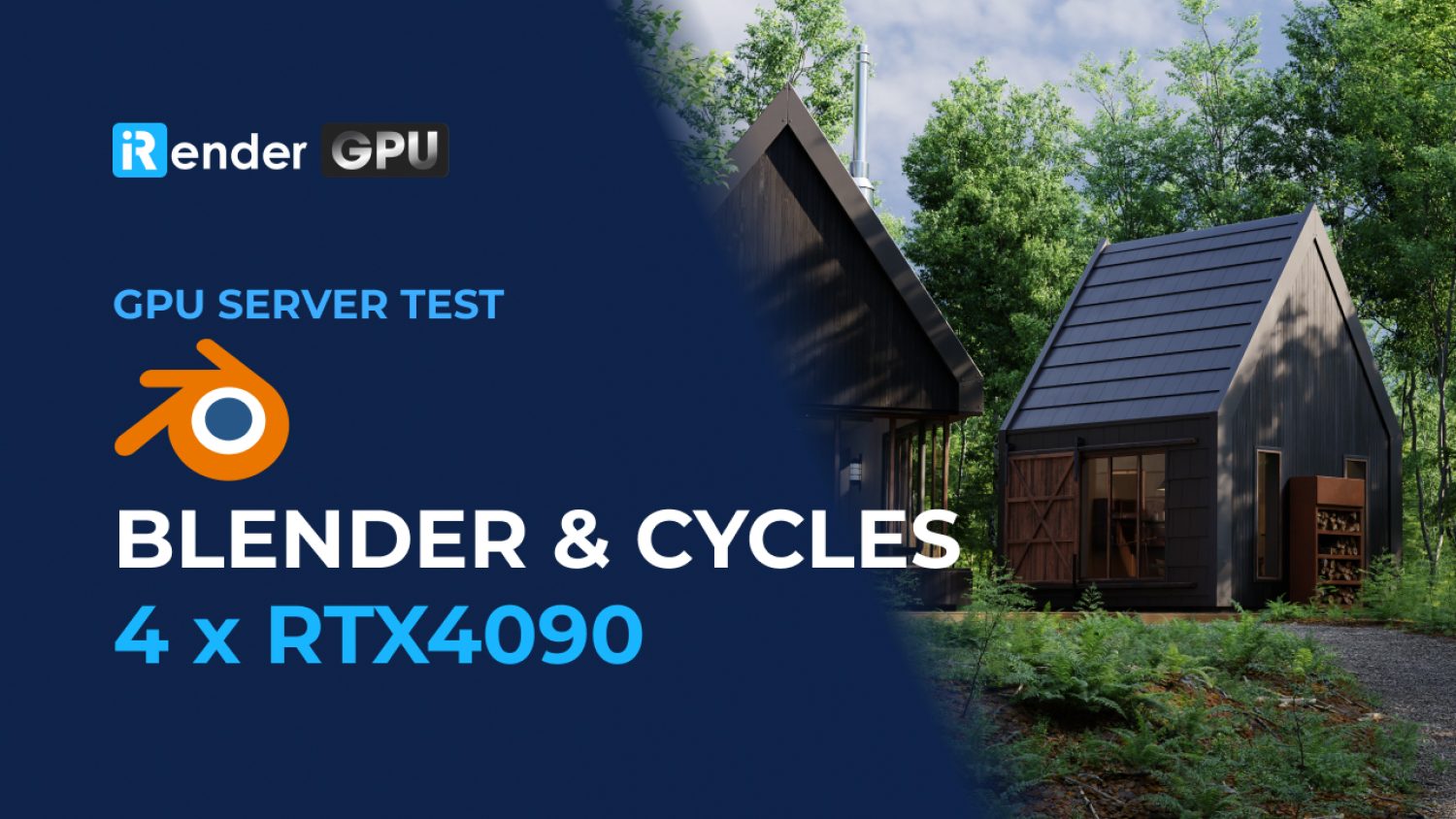
iRender: Blender Render Farm – GPU Nodes: 1/2/4x RTX 4090.
Support all 3D Render Engine with Blender: Cycles, Eevee, Workbench, Luxcore, Redshift, Octane, Vray, E-Cycles, Cycles X, K-Cycles and so on.

Blender: The Powerhouse of Open-Source 3D Creation
Blender is an open-source 3D animation software that can be used for every stage of the 3D pipeline, from modeling, rigging, animation, and simulation to rendering, compositing, motion tracking, and video editing. It also supports 2D animation. Blender can be used for a wide range of applications, including advertisements, animated feature films, TV series, etc. It offers a number of high-quality tools, such as envelope, skeleton and automatic skilling, B-spline interpolated bones, etc. Overall, it’s a great film 3D animation software tool, and great for developing moving 3D models for video games and other uses. You can also combine 2D and 3D right in the viewpoint, while the software has full animation support with Onion Skinning and layers and colors for stroke and fill.
Blender also supports input from motion-capturing software. You can even use facial motion capture using markers painted onto actors’ faces. It offers excellent clothing simulation that can be manipulated by the armature for added realism. You can also combine live-action footage with animation seamlessly with this software. With its flexible python-controlled interface, you can easily customize the interface layout and colors and create your own tools and addons. Although Blender is a free 3D animation software, it’s still one of the very best around and is a viable alternative to top-paid software like Maya.
Blender possesses many pioneering elements in the functions of 3D strengths:
-
-
-
- Opening files in Blender is backward compatible, which is not possible with Autodesk products.
- Super fast loading speed with a capacity of only about 250Mb compared to other common software about a few gigabytes, no need to install or run any platform.
- Open source sponsored by NVIDIA, AMD, Epic Games, and Ubisoft and supported by a large number of communities, from groups on social networks to forums.
-
-

Why Choose IaaS Over SaaS for Blender Multi-GPU Pipelines?
From Local Limits to Cloud Power: Blender Cycles Multi-GPU Speedup Analysis
- AMD or NVIDIA?
Blender’s internal render engines, Eevee (now Eevee Next) and Cycles, both support GPU rendering. Blender doesn’t limit the number of GPUs used to render a scene, and the performance scaling is close to linear for Cycles. For artists who love the realism of Cycles but find the render speed slower than Eevee, adding more GPUs is the most direct way to speed things up. In Edit > Preferences > System, you can choose your compute device type — CUDA or OptiX for NVIDIA (OptiX is recommended on RTX cards since it uses the dedicated ray-tracing cores), HIP for AMD, Metal for Apple Silicon, or oneAPI for Intel Arc — and select which GPUs to enable. Since Cycles X (Blender 3.0 and later), GPU rendering no longer splits the frame into tiles; instead, every enabled GPU works on the full frame together, progressively refining the image sample by sample. In general, a 2x GPU setup renders close to twice as fast as a single GPU, and setups with 6+ GPUs can cut render times by several times over, though exact scaling depends on scene complexity and VRAM usage.
In addition, if the rendering process uses only one GPU to both compute and display the screen, you may run into trouble with complex scenes (effects, materials, motion, etc.) due to limited VRAM and other interaction issues from sharing the same card for both display and rendering. Using a dedicated GPU purely for rendering, separate from the one driving your display, avoids this bottleneck entirely.
- Single-card or Multi-cards?
Blender’s internal tools like Eevee and Cycles both support rendering via GPU. Blender doesn’t limit the number of GPUs to render a scene, and the performance ratio is almost linear. For artists who love the realism of Cycles but the image processing speed is slower than Eevee, then using more GPU will definitely help you speed up your render. In the User Preferences >System > Compute Device, you can configure the CUDA device you want to use (or ignore). When rendering, each GPU will display a tile according to the settings on the Performance tab. The more GPUs you have, the more tiles are displayed simultaneously. For example, the same 2xGPU would be almost twice as fast as a GPU, and 6xGPU could reduce render times 4-5 times.
Using a dedicated secondary GPU for rendering also keeps your desktop interface smooth and responsive. When a single graphics card handles both the main display monitor and a heavy Cycles render, VRAM consumption skyrockets, which can cause UI lag or system freezes. Offloading the render load to multiple GPUs or a dedicated rendering card prevents display stutters, preserves primary system VRAM for scene editing, and ensures seamless multi-tasking during complex production pipelines.
Accelerating Blender with iRender Render Farm
iRender render farm is a GPU-Acceleration Cloud Rendering Service that provides high-performance computing with the latest GPUs through the Remote Desktop Application. The core difference between iRender compared to other render farms is our extremely unique render solution, completely different from the old SaaS solution, which is gradually revealing many limitations. In other words, this is a hardware service, not a software service. Modern artists will choose a machine configuration to suit their design needs and requirements of the graphic software, and subsequently have full authority to set up and control directly the remote machine through their own personal computers.
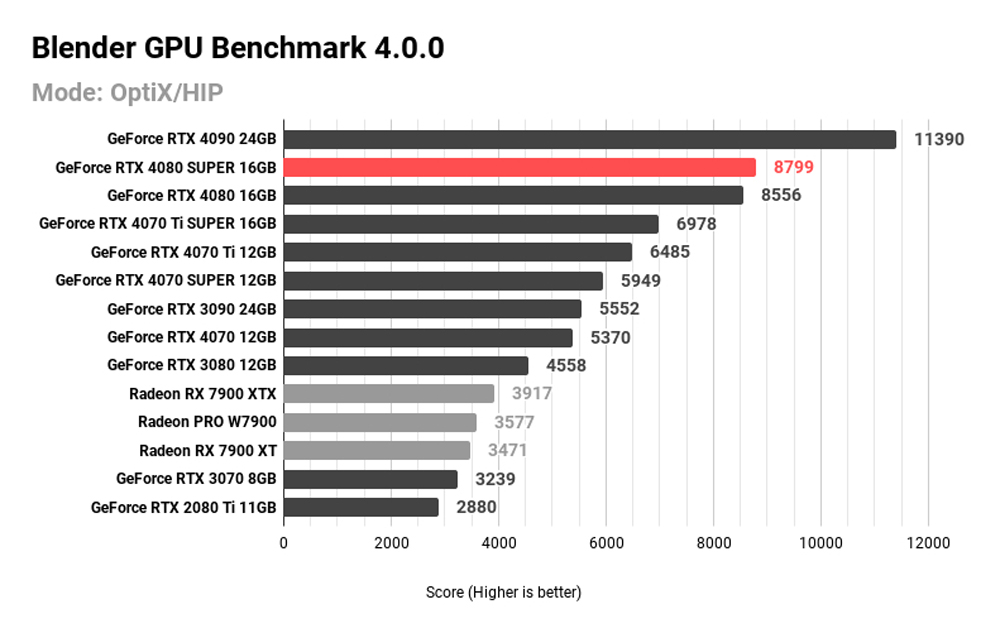
Let’s see how Blender performs on GPU Cloud Workstation in our latest benchmark!


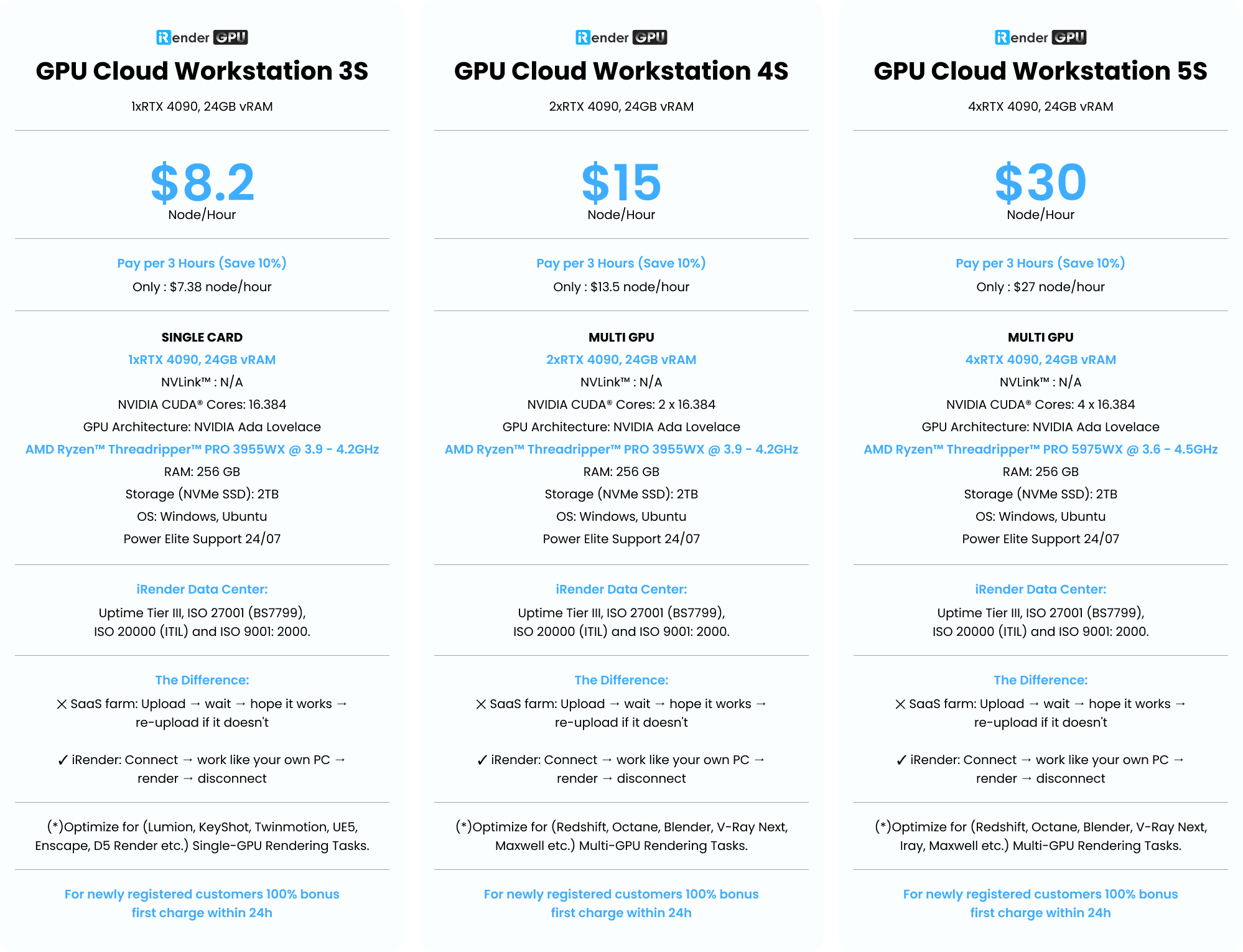
iRender always puts the needs of the customer as a priority to create the best server configurations, iRender is always a pioneer in the digital age with the latest graphics technologies. Our configuration easily meets all minimum system requirements for Blender. You can check the specs in the image below for reference:
Deeper Discount
You will be charged on a per-minute basis. Depending on the type of server you choose, we will issue you an invoice once you shut down the servers, so that you will control your balance easily.
The hourly rental option is always available for you to choose. However, you can always save 10% with our Rental Plan feature. For those who’re in need of a server for more than a day, or have an extremely large project, we advise choosing a daily/weekly/monthly rental package. The discount is attractive (10%).
We accept payment through Onepay, bank transfer, Visa/ Mastercard. And of course, we sometimes provide promotions for customers on special occasions. Staying connected with us to keep updating these programs.
Simple Process and Easy To Use
What you need to do is just 5 simple steps including: Creating an iRender account, Recharging money, Transferring your files to the remote server, Selecting a package and connecting to the server then finally Taking full control of the server and doing whatever you want.
We ensure that we provide you the easy-to-use interesting and effective solution. With just one or two clicks to create an image, and 7 to 15 minutes to boot the system in the first time, you will use the servers (GPUs & CPUs) like your own PC. Additionally, you just need to set up a working environment once, and save as Images to keep it for life.
With the aim to effectively equip users, reduce the procedure of using application and website at the same time, iRender has released a desktop app called iRender GPU App. It will contain almost all the features, help you to recharge your account, transfer files and connect to the remote servers/machines on your own local PC without having to come to the iRender website.
The following section will help you know how to install iRender GPU and use it.
- Download and install the app on your local PC.
- Register/login the app by your iRender account and follow this instruction to use it.

Real Human Support
Whether you are an iRender customer, or you are simply interested in our service, iRender has a great number of enthusiastic staff ready to support you daily from 6:00 to 24:00 (GMT+7). We believe the quality of support we provide is as vital as the technology we deliver. We provide unmatched support tailored to your specific needs and goals. iRender cares about the benefits of the users!
Thank You & Your Renders, Your Rules!

“We focus on people and the joy of creation!”
"iRender Farm’s green data center is powered by solar energy, as part of our natural and eco-friendly commitment to a sustainable future."
GPU Render Farm Pricing
Compare our server performance and price with major companies such as GPU Instances from AWS, GPU Instances from Google, Azure from Microsoft and GPU servers from small competitors. You’ll be surprised!
You can install all software you want on our remote server
GPU Cloud Workstation 3S
1xRTX 4090, 24GB vRAM- Pay per 3 hours and more (Save 10%)
- Only : $7.38 node/hour
- SINGLE CARD
- 1xRTX 4090, 24GB vRAM
- NVLink™ : N/A
- NVIDIA CUDA® Cores: 16.384
- GPU Architecture: NVIDIA Ada Lovelace
- AMD Ryzen™ Threadripper™ PRO 3955WX @ 3.9 - 4.2GHz
- RAM: 256 GB
- Storage (NVMe SSD): 2TB
- OS: Windows, Ubuntu
- Power Elite Support 24/07
- iRender Data Center: Uptime Tier III, ISO 27001 (BS7799), ISO 20000 (ITIL) and ISO 9001: 2000.
- The Difference: ✕ SaaS farm: Upload → wait → hope it works → re-upload if it doesn't ✓ iRender: Connect → work like your own PC → render → disconnect
- (*)Optimize for (Lumion, KeyShot, Twinmotion, UE5, Enscape, D5 Render etc.) Single-GPU Rendering Tasks.
- For newly registered customers 100% bonus first charge within 24h
GPU Cloud Workstation 4S
2xRTX 4090, 24GB vRAM- Pay per 3 hours and more (Save 10%)
- Only : $13.5 node/hour
- MULTI GPU
- 2xRTX 4090, 24 GB vRAM
- NVLink™ : N/A
- NVIDIA CUDA® Cores: 2 x 16.384
- GPU Architecture: NVIDIA Ada Lovelace
- AMD Ryzen™ Threadripper™ PRO 3955WX @ 3.9 - 4.2GHz
- RAM: 256 GB
- Storage (NVMe SSD): 2TB
- OS: Windows, Ubuntu
- Power Elite Support 24/07
- iRender Data Center: Uptime Tier III, ISO 27001 (BS7799), ISO 20000 (ITIL) and ISO 9001: 2000.
- The Difference: ✕ SaaS farm: Upload → wait → hope it works → re-upload if it doesn't ✓ iRender: Connect → work like your own PC → render → disconnect
- (*)Optimize for (Redshift, Octane, Blender, V-Ray Next, UE5, Maxwell etc.) Multi-GPU Rendering Tasks.
- For newly registered customers 100% bonus first charge within 24h
GPU Cloud Workstation 5S
4xRTX 4090, 24GB vRAM- Pay per 3 hours and more (Save 10%)
- Only : $27 node/hour
- MULTI GPU
- 4xRTX 4090, 24 GB vRAM
- NVLink™ : N/A
- NVIDIA CUDA® Cores: 4 x 16.384
- GPU Architecture: NVIDIA Ada Lovelace
- AMD Ryzen™ Threadripper™ PRO 5975WX @ 3.6 - 4.5GHz
- RAM: 256 GB
- Storage (NVMe SSD): 2TB
- OS: Windows, Ubuntu
- Power Elite Support 24/07
- iRender Data Center: Uptime Tier III, ISO 27001 (BS7799), ISO 20000 (ITIL) and ISO 9001: 2000.
- The Difference: ✕ SaaS farm: Upload → wait → hope it works → re-upload if it doesn't ✓ iRender: Connect → work like your own PC → render → disconnect
- (*)Optimize for (Redshift, Octane, Blender, V-Ray Next, Iray, Maxwell etc.) Multi-GPU Rendering Tasks.
- For newly registered customers 100% bonus first charge within 24h
(*) In addition, we also have professional machine configurations for AI Inference, AI Training, Deep Learning, VR/AR…
With Ada Lovelace GPU Architecture: 1/2/4 x RTX 4090, 24GB vRam.
Or any configuration you require, please contact directly for service. Sincerely thank you!
Latest News
The latest creative news from Cinema 4D Cloud Rendering , Blender Cloud Rendering, Redshift Cloud Rendering, Houdini Cloud Rendering , Octane Cloud Rendering, 3D VFX Plugins & Cloud Rendering.